

WELCOME

WELCOME

Term Dates - 2022/23

Key events for the Academic Year.

Term Dates - 2022/23

Key events for the Academic Year.

Term Dates - 2022/23

Key events for the Academic Year.

(All dates listed are inclusive)

Autumn Term

Training Day (no students) – Monday, 5th September 2022
Starts for Y7 only – Tuesday, 6th September 2022
Starts for all Year Groups – Wednesday, 7th September 2022
Half Term – Monday, 24th October – Friday, 28th October 2022
Training Day (no students)  – Friday, 18th November 2022
End of Term – Friday, 16th December 2022 (school closes at 12:15)

Spring Term

Starts – Tuesday, 3rd January 2023
Half Term – Monday, 20th February – Friday, 24th February 2023
End of Term – Friday, 31st March 2023

Summer Term

Starts – Monday, 17th April 2023
Bank Holiday – Monday, 1st May 2023
Bank Holiday (King’s Coronation) – Monday, 8th May 2023
Half Term
– Monday, 29th May 2023 – Friday, 2nd June 2023
Training Day (no students) – Friday, 30th June 2023
End of Term – Friday, 21st July 2023 (school closes at 12:15)

Add our School Calendar to your Smartphone, Tablet or Computer

To add our School ‘Term Dates & Key Events’ Calendar for 2022/23 to your smartphone or tablet click here and follow any on-screen instructions.

If you are using a computer you can subscribe to our Calendar. To do so ‘right click’ this link and copy it and paste it into the subscribe or add calendar feature of other calendars such as Outlook, Google Calendar etc.
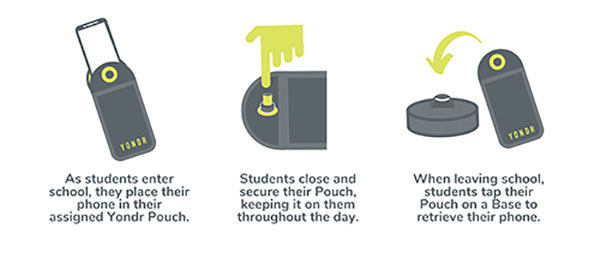
How Yondr Works

Frequently Asked Questions

We want our students to be engaged in their learning. A child at high school should not really have a reason to contact a parent during the day; however, if there is a genuine reason e.g. they have forgotten their packed lunch, a phone call can be made home from the school office. If a parent needs to contact their child in an emergency, they should contact the school office. If you need to contact your child during the school day, contact the main office on 01942 883796.

In case of a school emergency, we direct our students to safety first, following our school emergency procedures.


Students are in possession of their phone - in their Yondr pouch - for the entire school day. We will advise students to store the pouch safely in their school bag or blazer pockets.

If a student damages their Pouch or is caught on their phone, we will confiscate the phone and issue a sanction which is likely to be a suspension.

Note: Damage consists of any signs that the physical integrity of the pouch has been compromised, whether intentional or unintentional, as determined by the school or Yondr staff.

Damaged pouches will be charged to parents at a cost of £20.

They will be searched and wanded with a handheld scanner by a member of SLT. If they are found to have their phone on their person they will be expected to place it in their pouch. Refusal will be met with suspension.

If a student forgets their Pouch, their phone will be confiscated.

As per our previous mobile phone policy;

  • Confiscated phones will be taken to reception where the phone will be secured in the school safe.
  • Parents will be alerted to the phone confiscation via the school office.

Parents will have the option to collect the phone at the end of the day. If parents do not collect the phone, the phone will remain in school until the end of the week or until the student has their pouch.

In Yondr’s experience, this almost never happens. All students funnel past the unlocking stations at the exits, they want their phones back and don’t forget to unlock their pouches. If they do arrive home with a phone in a pouch, they can either come back to school to unlock it, or have a phone free evening!

The unlocking process is quick and takes under a second per student. 

As a privilege, Year 11 will be able to unlock their phones as they go off site at lunchtime; however, they will be expected to put their phones back into their pouches when they return to school for period 5.

Yes. There is an adapted version of the pouch which uses a Velcro fastener instead of a magnetic lock. This means the student still follows the policy, but the adapted pouch gives them easy access to their phone when required. If the student abuses this, they will face a sanction. We are already aware of these students.

Your Office 365 account username is your school network account username followed by @flhs.wigan.sch.uk 
The password is the same password that you use in school to access computers.