

WELCOME

WELCOME

Year 9 and Year 10 remote learning

You can download a copy of this letter as a PDF. 

Dear Year 9 and Year 10 Parent/Carer, 

You may already be aware that a significant number of our staff are having to self-isolate, and last week we unfortunately reached the point where we could not safely staff the school. 

Although there is no legal requirement for people who have tested positive for Covid-19 to self-isolate, there are still very clear guidelines in place for educational settings. These guidelines require any staff and students who test positive to stay away from school for between 5 and 10 days, dependent on having two consecutive clear LFD tests. 

We have been asking certain year groups to work from home; Year 10 have not yet been affected by this because we have purposely tried to keep them in school. However, as staffing has not improved and other year groups have already missed face-to-face learning, we have been forced to include Year 10 in our considerations as well as Year 9 again. 

For that reason, we are asking Year 9 and Year 10 students to remain at home with effect from Thursday 31st March, for the remainder of the week. 

We fully expect all year groups to be in school when we return after the Easter break. In the meantime, work will be provided for all students, including “live” lessons delivered through Microsoft Teams. Further guidance on how this will work are attached below. 

There are a small group of vulnerable students who will be able to work in school for the duration of time that their year group is unable to attend. The parents and carers of these students will be contacted directly by a member of the year team as soon as possible. 

I realise that this will be inconvenient for you, but we are left with no choice at this moment in time. I can assure you that every action we take is aimed at keeping all members of our community safe and I ask for your cooperation in continuing to work with us as we move through this next phase of the pandemic. 

Yours sincerely

Mr P Davies
Headteacher
Covid-19 Contingency Planning for Remote Curriculum Provision

What happens if a full year group needs to access remote learning?

Whilst students are not attending school, they will be advised to follow their normal timetable from home. Students will be expected to get up, get dressed and to be ready to access their lessons virtually, including form time. Where possible, teaching staff will deliver live lessons via Teams or a pre-recorded lesson. If a live lesson is not being delivered, work will be sent to the students. Students will need to check their Satchel One, their emails and Teams’ calendar daily to ensure they are receiving up-to-date information about their lessons and work. 

In the main, the class teacher will take responsibility for the setting of work for their class; however, in the event of a class teacher’s absence due to illness, lessons may have to be assigned to other members of staff within a department. 

Virtual lessons or recorded lessons will be carefully planned to facilitate independent study. Typically, the live delivery element of the lesson will last for 20-25 minutes. Teachers will provide explicit instruction, modelling and feedback for students. This will be followed by time to allow students to complete work independently. Teachers will provide clear and realistic deadlines for the submission of any work completed remotely. 

All students have been shown how to access their work through the various platforms available in Office 365, notably Teams and Email. For students still unsure on how to access the features of Office 365, instructional videos can be found here. Parents will be able to monitor the work being set through Satchel One (previously known as Show My Homework) 

Monitoring and support

Class teachers, Heads of Year and Heads of Faculty will all carefully monitor the engagement of students working remotely. Either the Head of Year or the classroom teachers will contact parents if there are any concerns with levels of engagement. Heads of Faculty are also closely monitoring the quality of provision as part of their routine quality assurance. 

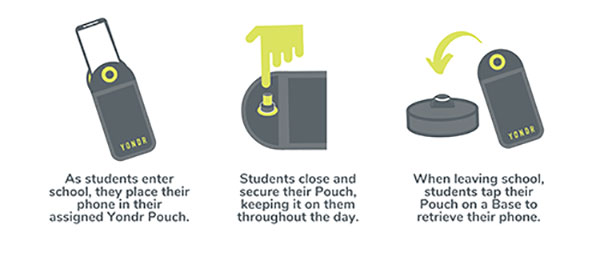
How Yondr Works

Frequently Asked Questions

We want our students to be engaged in their learning. A child at high school should not really have a reason to contact a parent during the day; however, if there is a genuine reason e.g. they have forgotten their packed lunch, a phone call can be made home from the school office. If a parent needs to contact their child in an emergency, they should contact the school office. If you need to contact your child during the school day, contact the main office on 01942 883796.

In case of a school emergency, we direct our students to safety first, following our school emergency procedures.


Students are in possession of their phone - in their Yondr pouch - for the entire school day. We will advise students to store the pouch safely in their school bag or blazer pockets.

If a student damages their Pouch or is caught on their phone, we will confiscate the phone and issue a sanction which is likely to be a suspension.

Note: Damage consists of any signs that the physical integrity of the pouch has been compromised, whether intentional or unintentional, as determined by the school or Yondr staff.

Damaged pouches will be charged to parents at a cost of £20.

They will be searched and wanded with a handheld scanner by a member of SLT. If they are found to have their phone on their person they will be expected to place it in their pouch. Refusal will be met with suspension.

If a student forgets their Pouch, their phone will be confiscated.

As per our previous mobile phone policy;

  • Confiscated phones will be taken to reception where the phone will be secured in the school safe.
  • Parents will be alerted to the phone confiscation via the school office.

Parents will have the option to collect the phone at the end of the day. If parents do not collect the phone, the phone will remain in school until the end of the week or until the student has their pouch.

In Yondr’s experience, this almost never happens. All students funnel past the unlocking stations at the exits, they want their phones back and don’t forget to unlock their pouches. If they do arrive home with a phone in a pouch, they can either come back to school to unlock it, or have a phone free evening!

The unlocking process is quick and takes under a second per student. 

As a privilege, Year 11 will be able to unlock their phones as they go off site at lunchtime; however, they will be expected to put their phones back into their pouches when they return to school for period 5.

Yes. There is an adapted version of the pouch which uses a Velcro fastener instead of a magnetic lock. This means the student still follows the policy, but the adapted pouch gives them easy access to their phone when required. If the student abuses this, they will face a sanction. We are already aware of these students.

Your Office 365 account username is your school network account username followed by @flhs.wigan.sch.uk 
The password is the same password that you use in school to access computers.