


Home > KS4 Options > ICT – KS4
The Computing Department offers three options at KS4 to enable students to explore their digital future in three discreet ways. Courses we offer cover three main strands of the Digital world around us. Using computers to design media pieces through iMedia, Developing a love of Code and Computer components through Computer Science and a GCSE in Business to enable students to explore the use of Software in the business world around them. All subjects offer a balance of practical and theoretical activities and prepare students for their use of IT in the real world and Further Education. For more specific information about each course please watch the attached video and speak to a teacher in the Computing Department.
To help you with finding out which of our subjects is best for you, the following booklets are available to read through to gain a more in depth understanding of what our Computer Science, Business Studies and Creative iMedia subjects.
The file above is provided in PDF format and will open on most computers, tablets and smartphones without the need for additional software, but if you need to download a reader follow this link (computers only) or on tablets and smartphones use the Apple iTunes or Google Play stores.
The file above is provided in PDF format and will open on most computers, tablets and smartphones without the need for additional software, but if you need to download a reader follow this link (computers only) or on tablets and smartphones use the Apple iTunes or Google Play stores.
The file above is provided in PDF format and will open on most computers, tablets and smartphones without the need for additional software, but if you need to download a reader follow this link (computers only) or on tablets and smartphones use the Apple iTunes or Google Play stores.
The Computing Department offers three options at KS4 to enable students to explore their digital future in three discreet ways. Courses we offer cover three main strands of the Digital world around us. Using computers to design media pieces through iMedia, Developing a love of Code and Computer components through Computer Science and a GCSE in Business to enable students to explore the use of Software in the business world around them. All subjects offer a balance of practical and theoretical activities and prepare students for their use of IT in the real world and Further Education. For more specific information about each course please watch the attached video and speak to a teacher in the Computing Department.
To help you with finding out which of our subjects is best for you, the following booklets are available for you to read through to gain a more in depth understanding of what our Computing, Business Studies and iMedia subjects are about.
The file above is provided in PDF format and will open on most computers, tablets and smartphones without the need for additional software, but if you need to download a reader follow this link (computers only) or on tablets and smartphones use the Apple iTunes or Google Play stores.
The file above is provided in PDF format and will open on most computers, tablets and smartphones without the need for additional software, but if you need to download a reader follow this link (computers only) or on tablets and smartphones use the Apple iTunes or Google Play stores.
The file above is provided in PDF format and will open on most computers, tablets and smartphones without the need for additional software, but if you need to download a reader follow this link (computers only) or on tablets and smartphones use the Apple iTunes or Google Play stores.
The Computing Department offers three options at KS4 to enable students to explore their digital future in three discreet ways. Courses we offer cover three main strands of the Digital world around us. Using computers to design media pieces through iMedia, Developing a love of Code and Computer components through Computer Science and a GCSE in Business to enable students to explore the use of Software in the business world around them. All subjects offer a balance of practical and theoretical activities and prepare students for their use of IT in the real world and Further Education. For more specific information about each course please watch the attached video and speak to a teacher in the Computing Department.
To help you with finding out which of our subjects is best for you, the following booklets are available for you to read through to gain a more in depth understanding of what our Computing, Business Studies and iMedia subjects are about.
The file above is provided in PDF format and will open on most computers, tablets and smartphones without the need for additional software, but if you need to download a reader follow this link (computers only) or on tablets and smartphones use the Apple iTunes or Google Play stores.
The file above is provided in PDF format and will open on most computers, tablets and smartphones without the need for additional software, but if you need to download a reader follow this link (computers only) or on tablets and smartphones use the Apple iTunes or Google Play stores.
The file above is provided in PDF format and will open on most computers, tablets and smartphones without the need for additional software, but if you need to download a reader follow this link (computers only) or on tablets and smartphones use the Apple iTunes or Google Play stores.
We want our students to be engaged in their learning. A child at high school should not really have a reason to contact a parent during the day; however, if there is a genuine reason e.g. they have forgotten their packed lunch, a phone call can be made home from the school office. If a parent needs to contact their child in an emergency, they should contact the school office. If you need to contact your child during the school day, contact the main office on 01942 883796.
In case of a school emergency, we direct our students to safety first, following our school emergency procedures.
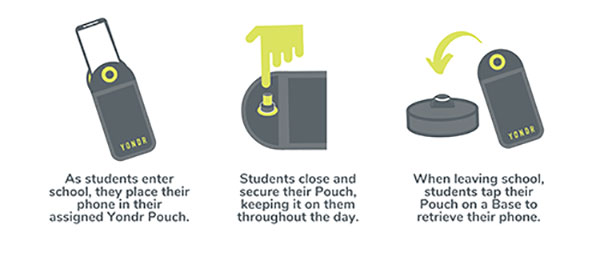
Students are in possession of their phone - in their Yondr pouch - for the entire school day. We will advise students to store the pouch safely in their school bag or blazer pockets.
If a student damages their Pouch or is caught on their phone, we will confiscate the phone and issue a sanction which is likely to be a suspension.
Note: Damage consists of any signs that the physical integrity of the pouch has been compromised, whether intentional or unintentional, as determined by the school or Yondr staff.
Damaged pouches will be charged to parents at a cost of £20.
They will be searched and wanded with a handheld scanner by a member of SLT. If they are found to have their phone on their person they will be expected to place it in their pouch. Refusal will be met with suspension.
If a student forgets their Pouch, their phone will be confiscated.
As per our previous mobile phone policy;
Parents will have the option to collect the phone at the end of the day. If parents do not collect the phone, the phone will remain in school until the end of the week or until the student has their pouch.
In Yondr’s experience, this almost never happens. All students funnel past the unlocking stations at the exits, they want their phones back and don’t forget to unlock their pouches. If they do arrive home with a phone in a pouch, they can either come back to school to unlock it, or have a phone free evening!
The unlocking process is quick and takes under a second per student.
As a privilege, Year 11 will be able to unlock their phones as they go off site at lunchtime; however, they will be expected to put their phones back into their pouches when they return to school for period 5.
Yes. There is an adapted version of the pouch which uses a Velcro fastener instead of a magnetic lock. This means the student still follows the policy, but the adapted pouch gives them easy access to their phone when required. If the student abuses this, they will face a sanction. We are already aware of these students.
Your Office 365 account username is your school network account username followed by @flhs.wigan.sch.uk
The password is the same password that you use in school to access computers.