

WELCOME

WELCOME

Open Evening 2021 Welcome Letter

You can download a copy of this letter as a PDF.

Dear Parent

Welcome to Fred Longworth High School. I hope that you have an enjoyable evening and that you have the chance to chat to some of our students about what life is like at our school.

Many of you will be anxious about the choice that you make over the next few weeks. Fortunately, there are several good schools within our local area and, whilst we believe that we are the best, the final decision will be about the choosing the school that best suits your child.

Past experience suggests that many of your questions tonight will be about admissions. There are always parents who are worried about whether their child will or will not be successful in gaining a place here and that, if they choose Fred Longworth as first choice and are not successful in their application because we are over-subscribed, they will damage their chances of being accepted at their second choice school.

I must stress that this is absolutely not the case.  Admissions are strictly controlled by the Local Authority and success depends entirely on how far a child meets the over-subscription criteria for each school. A school must not consider whether the parent has placed it as first, second or third choice if a child meets its over-subscription criteria. My advice is that if you want your child to come to Fred Longworth, you should indicate that we are your first choice, as the Local Authority try to place children in their first choice school if possible. If your application is unsuccessful, you will not be disadvantaged at your second and third choice schools. For reference, the admissions criteria is attached.

Please do not hesitate to ask if you have any further questions. In the meantime, enjoy the evening and I hope that this is the start of a long and successful partnership between you and Fred Longworth High School.

Yours sincerely

Mr P Davies

Headteacher
Admissions

  1. Children in Public Care.
  2. Children with brothers or sisters who will be attending the school at the time of admission.
  3. Children living in Mosley Common and Tyldesley, situated to the north of Manchester Road (Astley) and Chaddock Lane, to its junction with the East Lancashire Road, and thereafter the East Lancashire Road, with the exception of children who live nearer to Bedford High School than Fred Longworth High School, and children living in that part of Hindsford bounded to the east by the former Borough and Urban District Boundary and bounded to the north by the northerly access road to the Chanters Industrial Estate and Tyldesley Old Road to its junction with Millers Lane and bounded to the west by Millers Lane to its junction with Langley Platt Lane and the former Borough and Urban District Boundary. A map detailing the boundaries is available on the school website under Admissions.
  4. Children who live in Atherton and Tyldesley who attend one of the following associated primary schools: Tyldesley Primary School; Garrett Hall; St John’s Mosley Common; St George’s Central Tyldesley; St Stephen’s Astley; Chowbent; Hindsford CE; St Phillip’s Atherton; Parklee.
  5. Children living in the remainder of Tyldesley and the remainder of Atherton.
  6. Other children living nearest to the school.

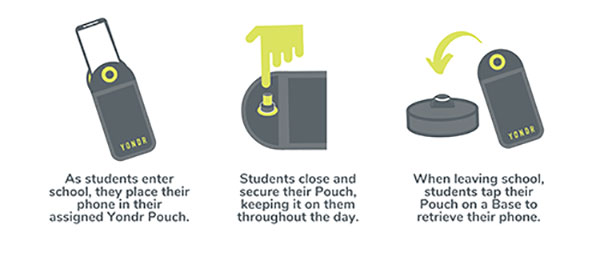
How Yondr Works

Frequently Asked Questions

We want our students to be engaged in their learning. A child at high school should not really have a reason to contact a parent during the day; however, if there is a genuine reason e.g. they have forgotten their packed lunch, a phone call can be made home from the school office. If a parent needs to contact their child in an emergency, they should contact the school office. If you need to contact your child during the school day, contact the main office on 01942 883796.

In case of a school emergency, we direct our students to safety first, following our school emergency procedures.


Students are in possession of their phone - in their Yondr pouch - for the entire school day. We will advise students to store the pouch safely in their school bag or blazer pockets.

If a student damages their Pouch or is caught on their phone, we will confiscate the phone and issue a sanction which is likely to be a suspension.

Note: Damage consists of any signs that the physical integrity of the pouch has been compromised, whether intentional or unintentional, as determined by the school or Yondr staff.

Damaged pouches will be charged to parents at a cost of £20.

They will be searched and wanded with a handheld scanner by a member of SLT. If they are found to have their phone on their person they will be expected to place it in their pouch. Refusal will be met with suspension.

If a student forgets their Pouch, their phone will be confiscated.

As per our previous mobile phone policy;

  • Confiscated phones will be taken to reception where the phone will be secured in the school safe.
  • Parents will be alerted to the phone confiscation via the school office.

Parents will have the option to collect the phone at the end of the day. If parents do not collect the phone, the phone will remain in school until the end of the week or until the student has their pouch.

In Yondr’s experience, this almost never happens. All students funnel past the unlocking stations at the exits, they want their phones back and don’t forget to unlock their pouches. If they do arrive home with a phone in a pouch, they can either come back to school to unlock it, or have a phone free evening!

The unlocking process is quick and takes under a second per student. 

As a privilege, Year 11 will be able to unlock their phones as they go off site at lunchtime; however, they will be expected to put their phones back into their pouches when they return to school for period 5.

Yes. There is an adapted version of the pouch which uses a Velcro fastener instead of a magnetic lock. This means the student still follows the policy, but the adapted pouch gives them easy access to their phone when required. If the student abuses this, they will face a sanction. We are already aware of these students.

Your Office 365 account username is your school network account username followed by @flhs.wigan.sch.uk 
The password is the same password that you use in school to access computers.