
Freddie's Focus
For Parents & Carers
- Issue 66
- November 24, 2023
Freddie's Focus
For Parents & Carers
- Issue 66
- November 24, 2023
Things to celebrate
- On Tuesday, we hosted our Personal Development drop down day. Students in all year groups took part in various activities linked to our PD curriculum including financial awareness, digital literacy, managing stress and team building. For Year 11, students attended our annual Careers Conference at Leigh Sports Village where they got to meet industry professionals, college representatives and take part in a range of activities related to different aspects of industry. A very successful day was had by all.
- On Thursday, we welcomed our Y11 parents and carers into school for our core examination event where specialist staff delivered masterclasses on revision strategies across the core subject areas. Many thanks for those who attended our core revision event – we hope you found the evening useful. Please could those who attended take a couple of minutes to offer your valuable feedback to help us improve this event in the future. Please click here to complete the short survey.
- On Thursday evening, our first group of skiers (Y7) attended Chill Factore in Manchester to begin to hone their skills on the slopes!
- Sporting Success this week
It’s been a busy week of sports at Freddie’s. Here are the results of our teams that played this week.
| Year Group / Team / Individual | |
|---|---|
| Football Y10 Boys | FLHS 2-7 St Marys |
| Football Y7/8 Girls | Multiple games held at home. Here are the results: FLHS B 0 – 0 St Marys ; FLHS A 2 – 0 St Marys; FLHS A 2 – 1 St Marys; FLHS B 0 – 1 St Marys; FLHS A 1 – 0 Deans T ; FLHS 1 – 0 Bedford |
| Netball Y7/8 | Y7 FLHS 4 – 9 St Marys; Y8 FLHS 5 – 8 St Marys |
| Netball Y10 | FLHS 8 – 10 Hindley |
| Football Y11 Boys | FLHS 4 – 1 Bedford |
School Reminders
-
Year 11 mock exam week
Week commencing 4th December is Year 11 mock exam week which will run through to 13th December. Students will be receiving their timetables next week.
-
General Reminder
All students are required to bring an appropriate bag to school. Please see our school uniform policy for further information.
School Reminders
-
Year 11 mock exam week
Week commencing 4th December is Year 11 mock exam week which will run through to 13th December. Students will be receiving their timetables next week.
-
General Reminder
All students are required to bring an appropriate bag to school. Please see our school uniform policy for further information.
How we learn
Last week we looked at Cognitive Load and how we support your child in school so that they do not get overloaded and can therefore learn more effectively. By establishing strong routines, we are able to build procedure that become habits.
Habits become part of students. They behave in the way that they need to behave, without thinking. And that means time and head space to think about the things you want them to think about- the learning. Routines are the foundation of good behaviour. They take time to communicate and embed. But nothing is worth your time more.
Tom Bennett
Homework and Self-directed study
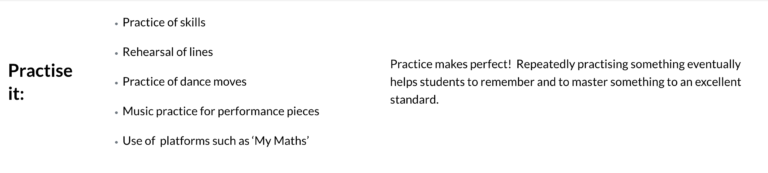
Here at Freddie’s, we focus on six types of homework to help our students broaden, consolidate and extend their learning. Below is an explanation of why we try to set ‘Practise it’ homework or encourage our students to self-direct their study time at home:
Microsoft Office
Did you know that your child can access Microsoft Office at home for free? As a student at Fred Longworth High School, your child is allowed to download a fully working free copy of Microsoft Office 365 to use on their computer, smartphone and tablet whilst they are a student at our school. Click on the button below to learn more.

Satchel:One
You can keep track of your child’s homework using Satchel:One. It is advisable to remind your child to get into the habit of checking their homework on Satchel:One regularly. Relying upon notifications is not the right approach and we advise students to turn off notifications so that they are not disturbed by them.

Homework Club
Please remind your child that homework club is available to all students Monday-Thursday in the Library (apart from Monday week B) where support and IT equipment is is available.
Attendance
We want to do all we can to support your child to be in school every day and ask that you support this important message from home, encouraging your child to avoid missing curriculum content through absence.
Message from the Headteacher

Dear Parents and Carers,
Following a meeting of the Board of Trustees on Monday this week, the trustees have asked me to pass on via this forum their thanks to all the students who took part in the Remembrance Parade on Sunday 12th November. The students were a credit to the school and their families. It was lovely to see so many other students involved in the parade too through various local youth organisations.
I’d like to thank all the parents of Year 11 who came into school on Thursday for the exam information evening. We hope you found the event useful. The Year 11 Mock examinations will be upon us very soon and students should be preparing for these now. The mock exams start on Monday 4th December. Year 11 had a fabulous experience at the Careers Conference on Tuesday and hopefully they all found the event inspirational.
Thank you for your continued support.