

WELCOME

WELCOME

Our Alumni Network brings together former students, staff and friends of Fred Longworth High School, providing a place to reconnect, share memories and stay connected with the school.

Whether you left last year or many years ago, we would love to hear from you. By joining the network, you can reconnect with old friends, discover what is happening at the school, celebrate the achievements of fellow alumni and find opportunities to support the next generation of Fred Longworth students.

Our alumni community is a valuable part of the school’s past, present and future. Together, we can celebrate our shared history, build new connections and help create exciting opportunities for current and future students.

Reconnect. Remember. Inspire. Belong.

Join the Fred Longworth Alumni Network and stay part of our story. To join our alumni network, click here.
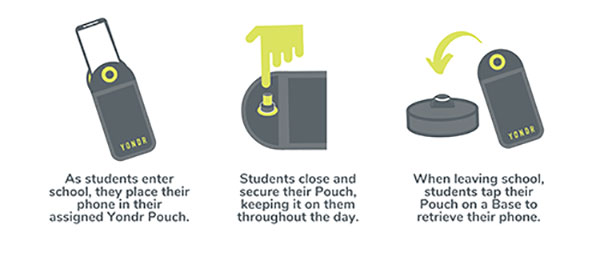
How Yondr Works

Frequently Asked Questions

We want our students to be engaged in their learning. A child at high school should not really have a reason to contact a parent during the day; however, if there is a genuine reason e.g. they have forgotten their packed lunch, a phone call can be made home from the school office. If a parent needs to contact their child in an emergency, they should contact the school office. If you need to contact your child during the school day, contact the main office on 01942 883796.

In case of a school emergency, we direct our students to safety first, following our school emergency procedures.


Students are in possession of their phone - in their Yondr pouch - for the entire school day. We will advise students to store the pouch safely in their school bag or blazer pockets.

If a student damages their Pouch or is caught on their phone, we will confiscate the phone and issue a sanction which is likely to be a suspension.

Note: Damage consists of any signs that the physical integrity of the pouch has been compromised, whether intentional or unintentional, as determined by the school or Yondr staff.

Damaged pouches will be charged to parents at a cost of £20.

They will be searched and wanded with a handheld scanner by a member of SLT. If they are found to have their phone on their person they will be expected to place it in their pouch. Refusal will be met with suspension.

If a student forgets their Pouch, their phone will be confiscated.

As per our previous mobile phone policy;

  • Confiscated phones will be taken to reception where the phone will be secured in the school safe.
  • Parents will be alerted to the phone confiscation via the school office.

Parents will have the option to collect the phone at the end of the day. If parents do not collect the phone, the phone will remain in school until the end of the week or until the student has their pouch.

In Yondr’s experience, this almost never happens. All students funnel past the unlocking stations at the exits, they want their phones back and don’t forget to unlock their pouches. If they do arrive home with a phone in a pouch, they can either come back to school to unlock it, or have a phone free evening!

The unlocking process is quick and takes under a second per student. 

As a privilege, Year 11 will be able to unlock their phones as they go off site at lunchtime; however, they will be expected to put their phones back into their pouches when they return to school for period 5.

Yes. There is an adapted version of the pouch which uses a Velcro fastener instead of a magnetic lock. This means the student still follows the policy, but the adapted pouch gives them easy access to their phone when required. If the student abuses this, they will face a sanction. We are already aware of these students.

Your Office 365 account username is your school network account username followed by @flhs.wigan.sch.uk 
The password is the same password that you use in school to access computers.