
Freddie's Focus
For Parents & Carers
- Issue 63
- November 3, 2023
Freddie's Focus
For Parents & Carers
- Issue 63
- November 3, 2023
Things to celebrate
- The opening of our new build! We are incredibly proud of the way in which our students have conducted themselves and worked together to establish our routines in the beautiful new school.
- We had a lovely message from one of our local cafes regarding the behaviour of our students. We wanted to share the comment that these young people are ‘a credit to the school and parents’.
- On Friday 20th October, a group of our students took part in a trip to Belgium. A wonderful experience was had by all as students explored the poignant sites of WWI.
School Reminders
-
Progress Review Evening
On Monday 13th November, we will be holding 5 minute ‘Progress Review’ meetings with Form Tutors online from 2pm. See the link below for further information.
-
Year 11 Core examination support
Advanced notice that on Thursday 23rd November, we will be hosting a Year 11 Core examination support event for parents and carers. Further information to follow.
-
General Reminder
Please would parents and carers refrain from dropping their children off at the school gates. Additional traffic coming down Printshop Lane and into the school area is creating a huge problem for us and is unsafe for our students.
School Reminders
-
Progress Review Evening
On Monday 13th November, we will be holding 5 minute ‘Progress Review’ meetings with Form Tutors online from 2pm. See the link below for further information.
-
Year 11 Core examination support
Advanced notice that on Thursday 23rd November, we will be hosting a Year 11 Core examination support event for parents and carers. Further information to follow.
-
General Reminder
Please would parents and carers refrain from dropping their children off at the school gates. Additional traffic coming down Printshop Lane and into the school area is creating a huge problem for us and is unsafe for our students.
How we learn
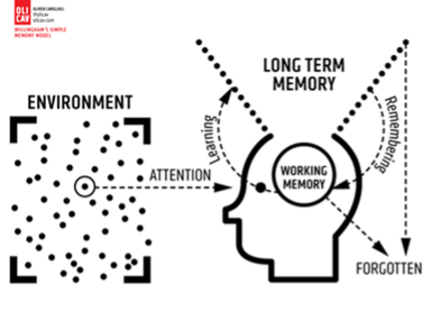
This diagram indicates how the memory works. The working memory has a very limited capacity. Information stored in the working memory that is not rehearsed can be lost between 18 to 30 seconds. This means that we need to do something with that information and regularly revisit that information to make it stick and remain in the long-term memory. To learn something means that there has been a change in our long-term memory. We’ve now stored something there and it remains there!
The video below will show youa short clip which explains how learning happens:
It is our job as teachers to help students to learn information so that it sticks. Parents and carers can support their children at home to revise material learned in class so that it has more chance of sticking. Over the next few weeks, we will share with you some of the things that we do to help knowledge stick and some of the things that your children can do at home during self-directed study.
Homework and Self-directed study
Microsoft Office
Did you know that your child can access Microsoft Office at home for free? As a student at Fred Longworth High School, your child is allowed to download a fully working free copy of Microsoft Office 365 to use on their computer, smartphone and tablet whilst they are a student at our school. Click on the button below to learn more.

Satchel:One
You can keep track of your child’s homework using Satchel:One. It is advisable to remind your child to get into the habit of checking their homework on Satchel:One regularly. Relying upon notifications is not the right approach and we advise students to turn off notifications so that they are not disturbed by them.

Homework Club
Please remind your child that homework club is available to all students Monday-Thursday in the Library (apart from Monday week B) where support and IT equipment is is available.
Attendance
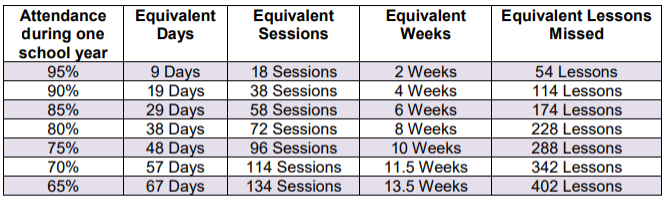
We want to do all we can to support your child to be in school every day and ask that you support this important message from home, encouraging your child to avoid missing curriculum content through absence. Here is a breakdown of the absences for the following attendance percentages:
Message from the Headteacher

Dear Parents and Carers,
I would like to thank all parents and carers for bearing with us over the last few weeks as we moved into our new school building. There are still a few snagging issues that we will continue to work through over the coming weeks to ensure the school functions as we want it to. However now that we are in, I can honestly say that this is a fantastic space for your children to learn and it will only get better.
It has been an absolute pleasure to welcome all the students back this week, and the community should be very pleased with this £24 million pound investment in the education of young people in this area. As you can appreciate, we have been very busy with the move but hopefully in the coming few days and weeks, we will be able to share some images of our new school and eventually, invite parents in to see the building for themselves.