
Careers Curriculum & Guidance in Schools
Careers Curriculum & Guidance Information.
Careers Curriculum & Guidance in Schools
Careers Curriculum & Guidance Information.
Careers Curriculum & Guidance in Schools
Careers Curriculum & Guidance Information.
Home > Careers Education > Careers Curriculum & Guidance in Schools


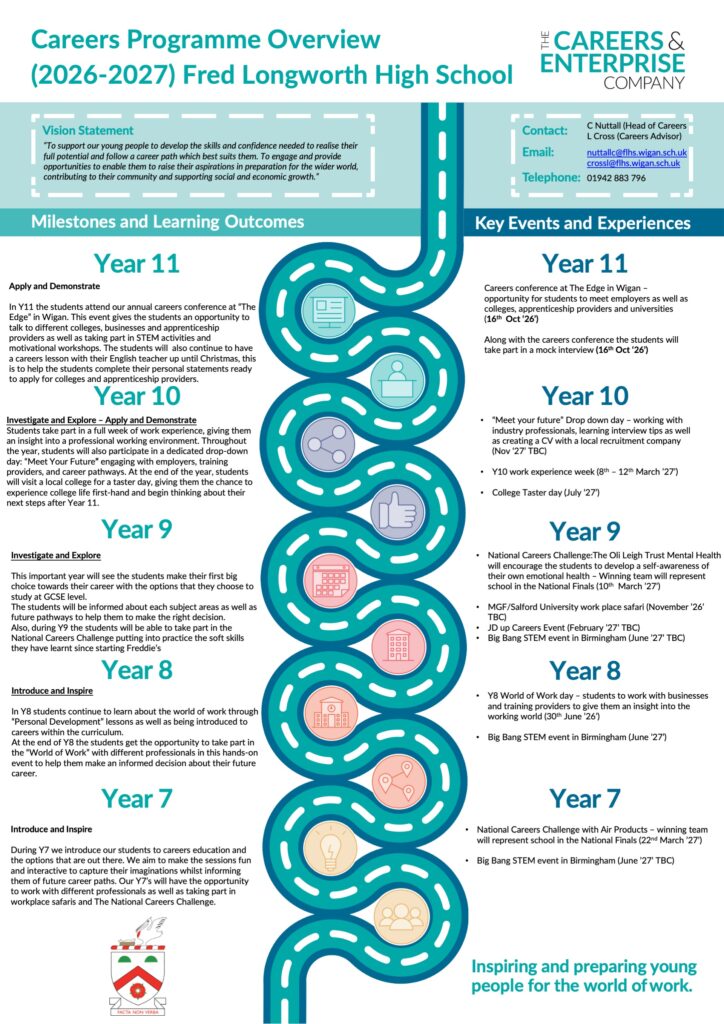
Careers is embedded into our curriculum at Fred Longworth High School. Throughout the academic year and across all year groups we have various activities happening, such as; employer talks, visits from a variety of education and training providers, real world links, mentoring opportunities. There are also lots of mini projects that students can get involved in such as business enterprise challenges / STEM competitions etc. Each faculty has a focus on careers and we have established a careers champion in each area who is responsible for this.
You can click on the above links to see the Gatsby benchmarks, which we strive as a school to achieve in all areas of careers. All students from Year 8 – 11 have access to Xello – which is a programme giving lots of information about current and post 16 opportunities, along with general careers information (students have automatic sign in using Office 365).
KS3 (Years 7, 8 & 9)
Throughout KS3 Careers is delivered generally through the curriculum with some work done on PSHE days. Students also have a 6 week period of form time dedicated to careers exploration.
Students in year 8 and 9 can access Xello (app) via office 365 to start their career planning journey.
PSHE form time focussed on Careers information.
PSHE day – World of Work Day (Year 8).
Year 10
Throughout the academic year, year 10 students have access to appointments with the careers adviser and access a variety of information assemblies and talks from external providers / employers.
Year 10 Curriculum Evening
Futures Questionnaire – this is a questionnaire about what students are thinking about doing in the future – this helps us prioritise and gives students the correct level of support.
College Open events September – December
PSHE Careers Day – March
Individual Careers Guidance Interviews with Miss Cross, Careers Adviser
PSHE Careers Day – June
Year 10 College Taster Visits – July
Year 11
Throughout the academic year, year 11 students all have a 1-1 guidance appointment with the careers adviser this will take place before February half term. Year 11 also have a careers lesson every 2 weeks, with a focus on preparing them for finishing school and their applications. Along with a variety of providers coming to speak to them about the opportunities available after school.
Careers Lessons – every 2 weeks
Individual Careers Guidance Interviews with Miss Cross, Careers Adviser
College Open events Sep – Dec
Careers Conference at Leigh Sports Village – October
Mock Interview Day – November
Applications to College to be completed by December.
College Interviews (Nov – April)
Application process for Apprenticeships / Training starts (continuous through to summer)
GCSE Exams
Transition to next steps.